Brink at work · Reviews & 1:1s

You tracked it.
The review writes itself.

Every task you finish in Brink is already written down: what it was, who it was for, when it was done. At review time, Brink turns that into one page you can send to your boss.

And if you lead people, the same tasks prep your 1:1s.

Start freeDownload on the App Store

Write my review and Prep 1:1 are part of Brink Pro, $1.99 a month.

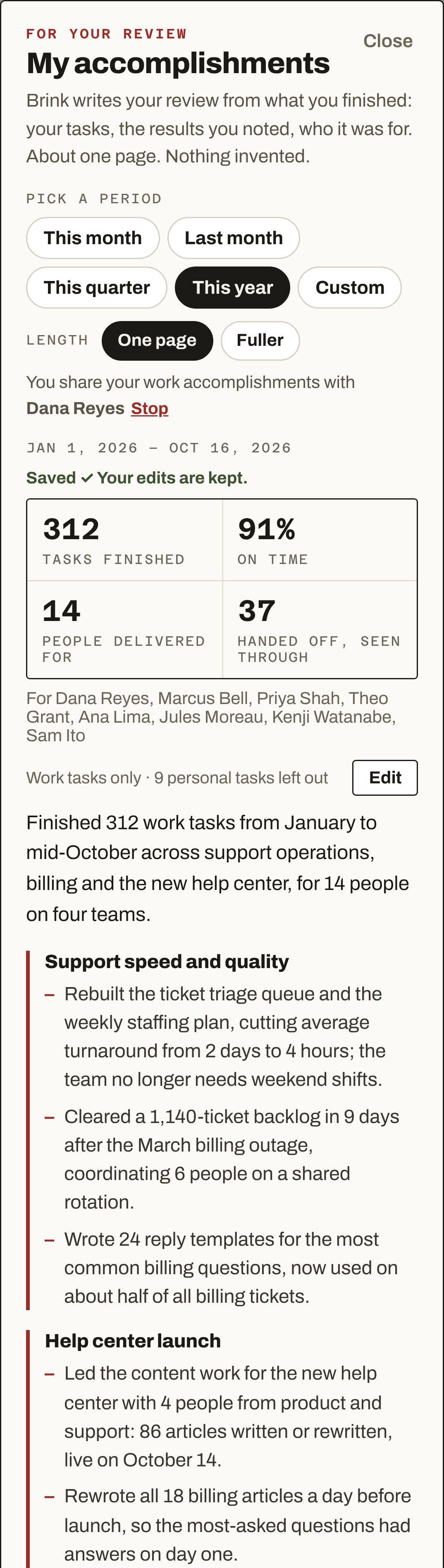
Write my review in Brink, This year: 312 tasks finished, 91% on time, 14 people delivered for, 37 handed off and seen through. Then the summary and the first themes of the write-up.
How it works

Track the work. Brink keeps the record.

1
You track tasks.What you handed off, what you were given, where each one stands.
2
You finish one.Brink asks for the result in a line. Skip it if there isn’t one.
3
It adds up.312 done by October. Brink remembers all of it, so you don’t have to.
4
Review time.One tap writes it up for you. Your boss taps once to prep your 1:1.
Your side

Your year, on one page. Ready when your boss asks.

Meet Riley. They run support operations and work for Dana. Here is how Riley’s review gets written.

1 · Finish a task

Brink asks one question.

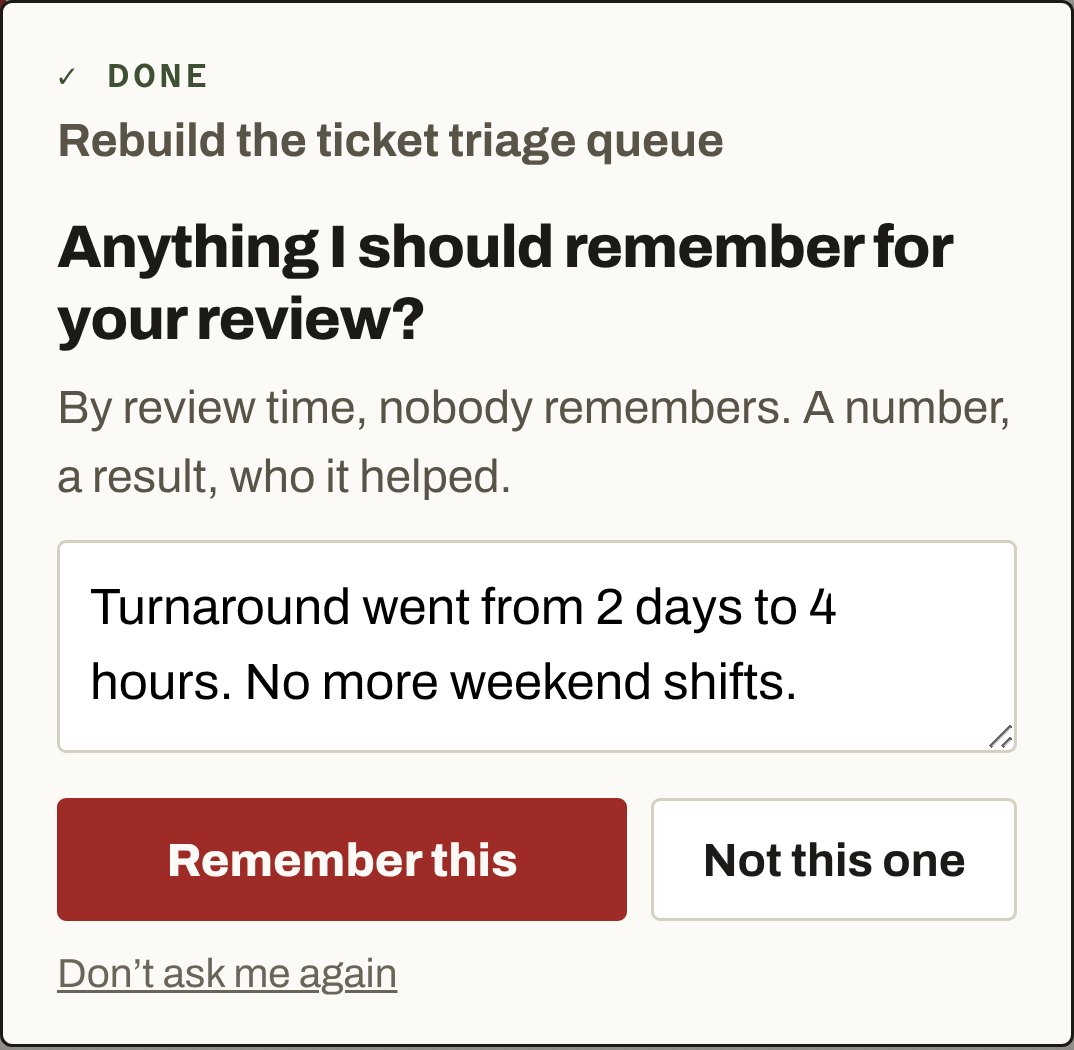
“Anything I should remember for your review?” Riley types the result. Brink keeps it with the task.

Done: Rebuild the ticket triage queue. Anything I should remember for your review? By review time, nobody remembers. A number, a result, who it helped. Riley typed: Turnaround went from 2 days to 4 hours. No more weekend shifts. Buttons: Remember this, Not this one, Don't ask me again.
2 · Write my review

Pick a period. Read it.

Brink groups the year into themes, leads with results, and leaves routine work and personal tasks out. Tap Edit to change any line.

My accomplishments, Jan 1 to Oct 16, 2026: 312 tasks finished, 91% on time, 14 people delivered for, 37 handed off and seen through. Summary and the themes Support speed and quality, and Help center launch.
3 · Make it stronger

Add the numbers only you know.

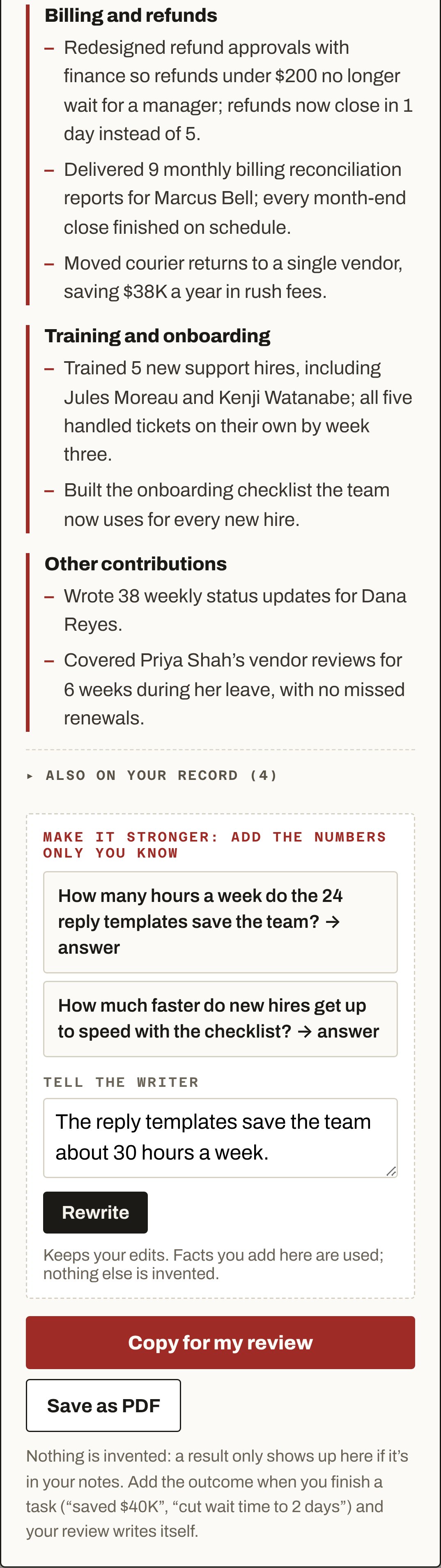
Brink asks where a number is missing. Answer in a line, tap Rewrite. Then Copy for my review, and paste it into your review form or an email to your boss.

The rest of the write-up: Billing and refunds, Training and onboarding, Other contributions. Then Make it stronger: add the numbers only you know, with two questions, a Tell the writer box, Rewrite, Copy for my review and Save as PDF.
Riley’s review, in full

Accomplishments: Jan 1, 2026 to Oct 16, 2026

312 tasks finished · 91% on time (of 188 with a due date) · delivered for 14 people · 37 handed off and seen through

Finished 312 work tasks from January to mid-October across support operations, billing and the new help center, for 14 people on four teams.

Support speed and quality
  • Rebuilt the ticket triage queue and the weekly staffing plan, cutting average turnaround from 2 days to 4 hours; the team no longer needs weekend shifts.
  • Cleared a 1,140-ticket backlog in 9 days after the March billing outage, coordinating 6 people on a shared rotation.
  • Wrote 24 reply templates for the most common billing questions, now used on about half of all billing tickets.
Help center launch
  • Led the content work for the new help center with 4 people from product and support: 86 articles written or rewritten, live on October 14.
  • Rewrote all 18 billing articles a day before launch, so the most-asked questions had answers on day one.
Billing and refunds
  • Redesigned refund approvals with finance so refunds under $200 no longer wait for a manager; refunds now close in 1 day instead of 5.
  • Delivered 9 monthly billing reconciliation reports for Marcus Bell; every month-end close finished on schedule.
  • Moved courier returns to a single vendor, saving $38K a year in rush fees.
Training and onboarding
  • Trained 5 new support hires, including Jules Moreau and Kenji Watanabe; all five handled tickets on their own by week three.
  • Built the onboarding checklist the team now uses for every new hire.
Other contributions
  • Wrote 38 weekly status updates for Dana Reyes.
  • Covered Priya Shah’s vendor reviews for 6 weeks during her leave, with no missed renewals.
Every line comes from Riley’s own tasks and the results they noted. Riley can edit any line before sending it. Made-up names and numbers.
Your boss’s side

A real 1:1, prepped in a minute.

Dana leads a team of five. She sees the tasks she gave Riley as they move. When Riley finishes one, Brink asks Dana one question too.

1 · Someone on your team finishes a task

Add a note while it’s fresh.

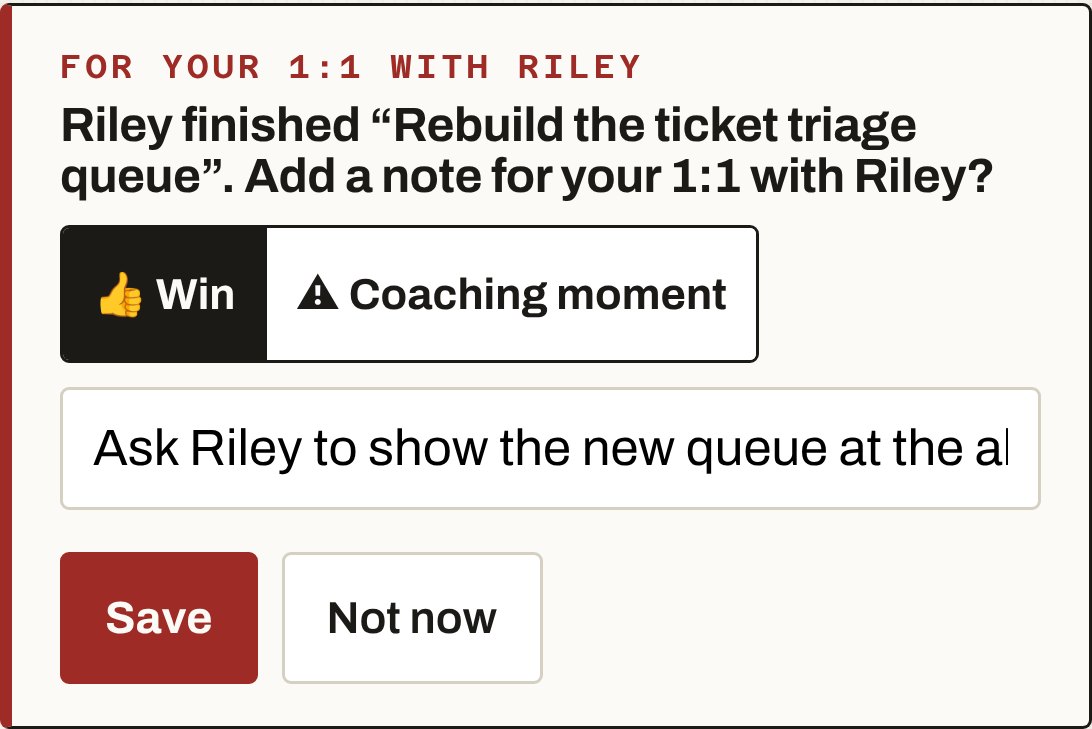
A win or a coaching moment, in a line. It waits for the next 1:1. Or tap Not now.

For your 1:1 with Riley. Riley finished “Rebuild the ticket triage queue”. Add a note for your 1:1 with Riley? Win or Coaching moment. Dana typed: Ask Riley to show the new queue at the all-hands. Save, Not now.
2 · Before you meet: Prep 1:1

Brink reads the tasks since your last 1:1 and builds the meeting.

Their work first: what they finished, why it mattered, what is stuck, and what you can take off their plate. Your notes are in it. Only you see it. Prep 1:1 shows up once you have someone on your team.

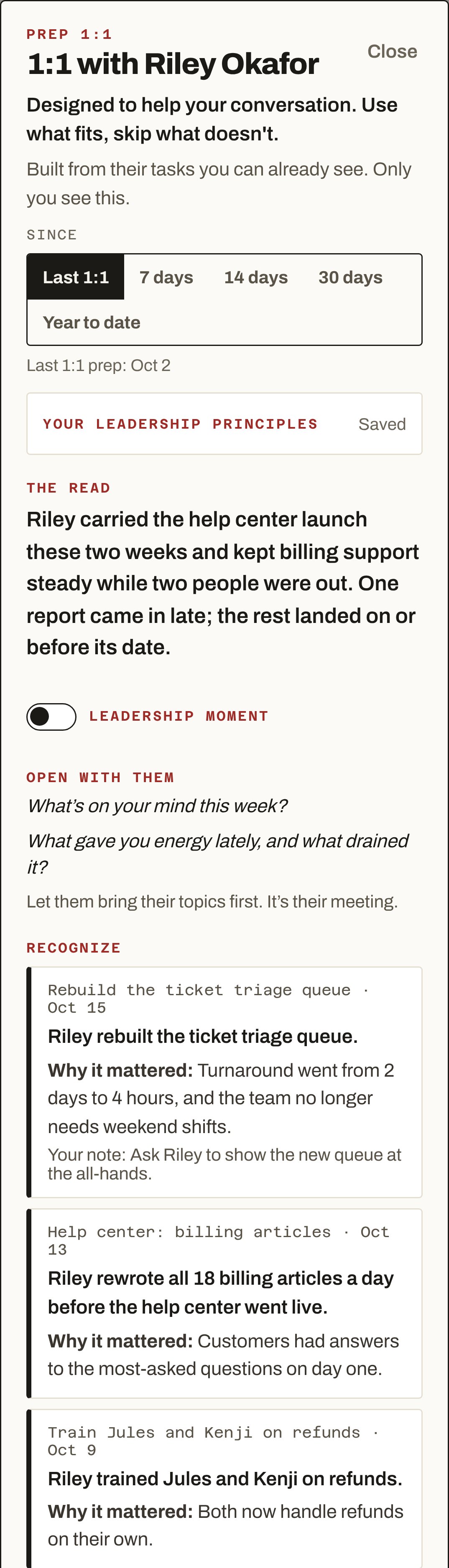
Prep 1:1: 1:1 with Riley Okafor, since last 1:1 on Oct 2. The read. Open with them. Recognize, three items, each with Why it mattered, and Dana's note on the triage queue.

The read, Open with them, Recognize.

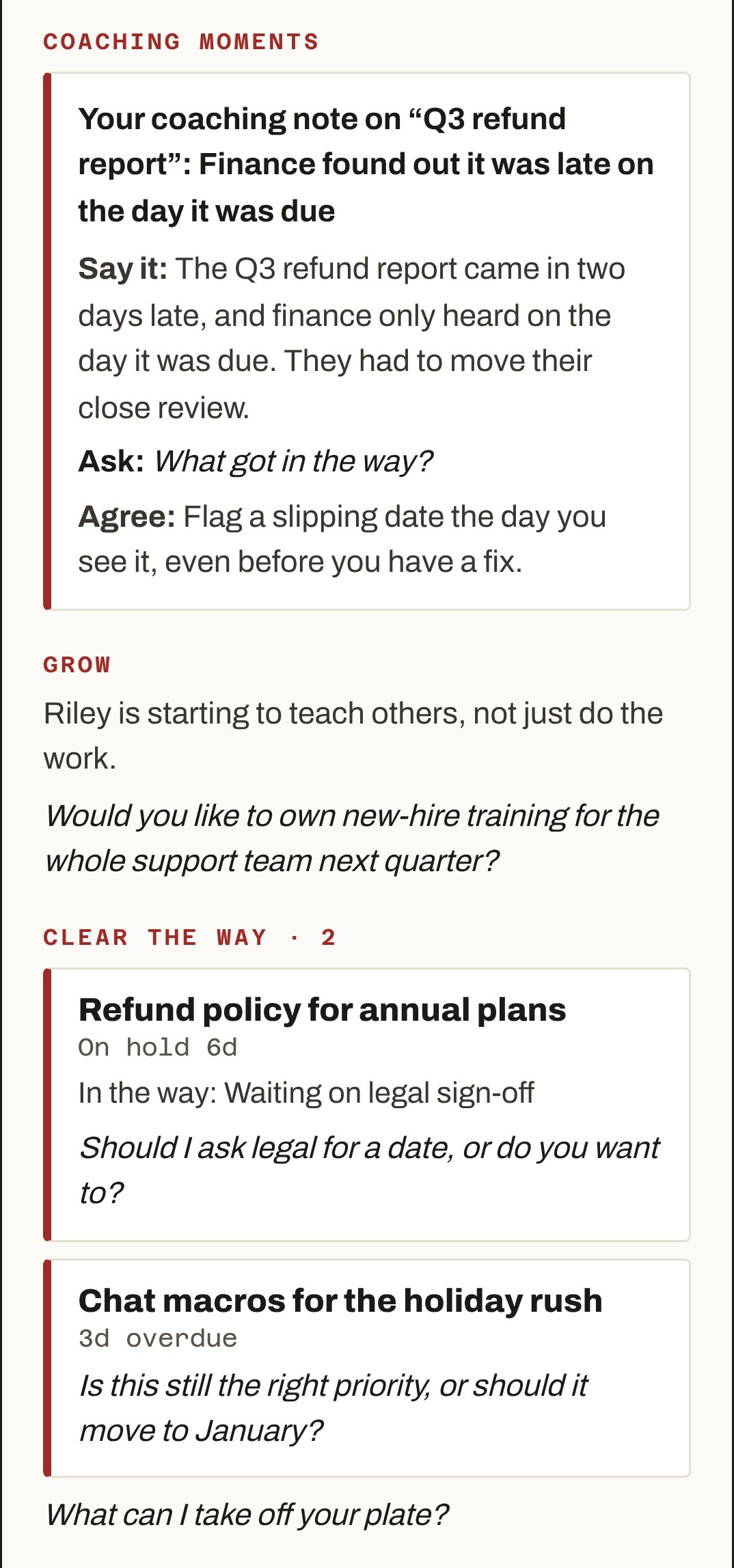
Coaching moments: Say it, Ask, Agree. Grow, with a question. Clear the way: Refund policy for annual plans, on hold 6 days, in the way: waiting on legal sign-off. Chat macros for the holiday rush, 3 days overdue. What can I take off your plate?

Coaching moments, Grow, Clear the way.

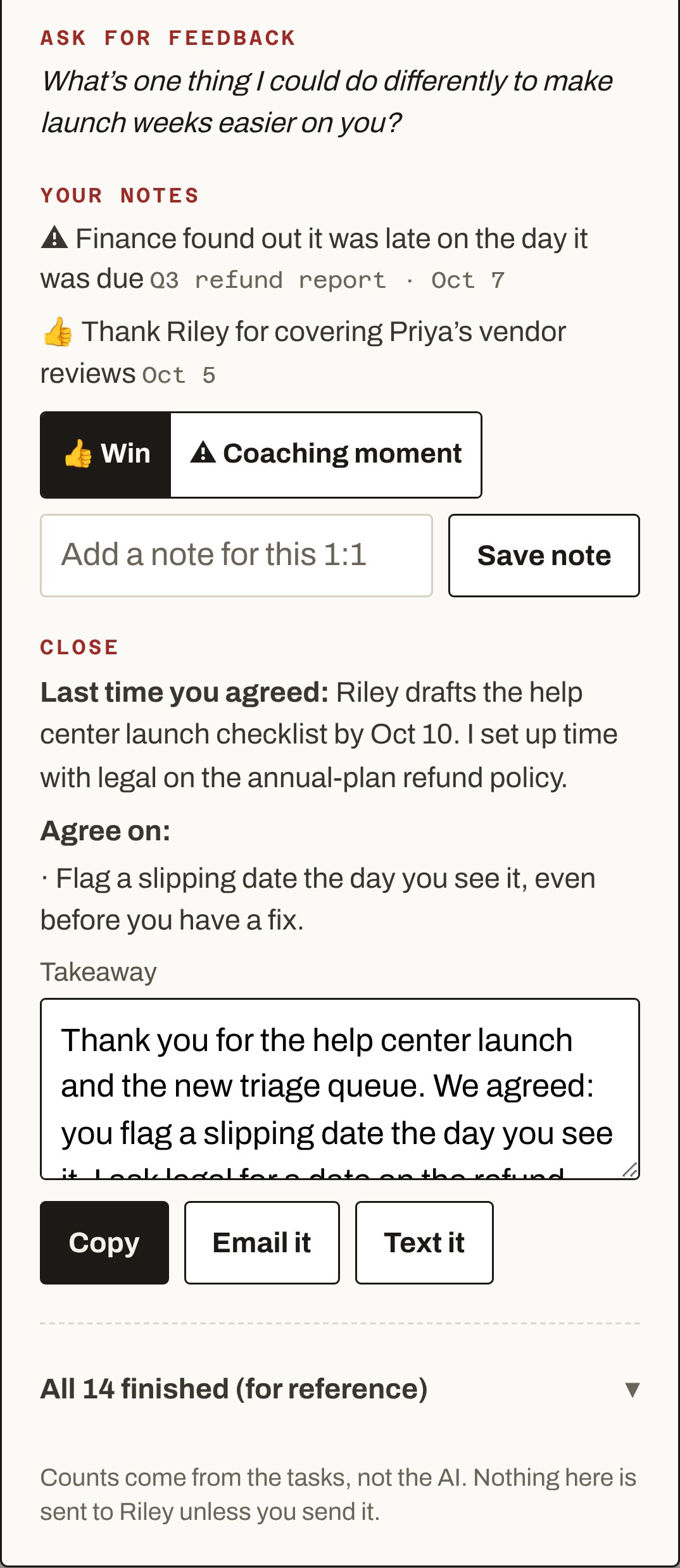
Ask for feedback. Your notes. Close: Last time you agreed, Agree on, a takeaway to copy, email or text. All 14 finished, for reference.

Ask for feedback, Your notes, Close.

Prep 1:1 · since last 1:1, Oct 2

1:1 with Riley Okafor

Designed to help your conversation. Use what fits, skip what doesn’t.

The read

Riley carried the help center launch these two weeks and kept billing support steady while two people were out. One report came in late; the rest landed on or before its date.

Open with them

What’s on your mind this week?

What gave you energy lately, and what drained it?

Let them bring their topics first. It’s their meeting.

Recognize
Rebuild the ticket triage queue · Oct 15
Riley rebuilt the ticket triage queue.
Why it mattered: Turnaround went from 2 days to 4 hours, and the team no longer needs weekend shifts.
Your note: Ask Riley to show the new queue at the all-hands.
Help center: billing articles · Oct 13
Riley rewrote all 18 billing articles a day before the help center went live.
Why it mattered: Customers had answers to the most-asked questions on day one.
Train Jules and Kenji on refunds · Oct 9
Riley trained Jules and Kenji on refunds.
Why it mattered: Both now handle refunds on their own.
Coaching moments
Your coaching note on “Q3 refund report”: Finance found out it was late on the day it was due
Say it: The Q3 refund report came in two days late, and finance only heard on the day it was due. They had to move their close review.
Ask: What got in the way?
Agree: Flag a slipping date the day you see it, even before you have a fix.
Grow

Riley is starting to teach others, not just do the work.

Would you like to own new-hire training for the whole support team next quarter?

Clear the way · 2
Refund policy for annual plans
On hold 6d
In the way: Waiting on legal sign-off
Should I ask legal for a date, or do you want to?
Chat macros for the holiday rush
3d overdue
Is this still the right priority, or should it move to January?

What can I take off your plate?

Ask for feedback

What’s one thing I could do differently to make launch weeks easier on you?

Your notes

⚠ Finance found out it was late on the day it was due Q3 refund report · Oct 7

👍 Thank Riley for covering Priya’s vendor reviews Oct 5

Close

Last time you agreed: Riley drafts the help center launch checklist by Oct 10. I set up time with legal on the annual-plan refund policy.

Agree on: Flag a slipping date the day you see it, even before you have a fix.

Takeaway (Dana copies, emails or texts it to Riley)
Thank you for the help center launch and the new triage queue. We agreed: you flag a slipping date the day you see it. I ask legal for a date on the refund policy by Friday. Next quarter you take the lead on new-hire training.

Counts come from the tasks, not the AI. Nothing here is sent to Riley unless Dana sends it. Made-up names.
3 · Once a year: Year to date

The whole year for one person.

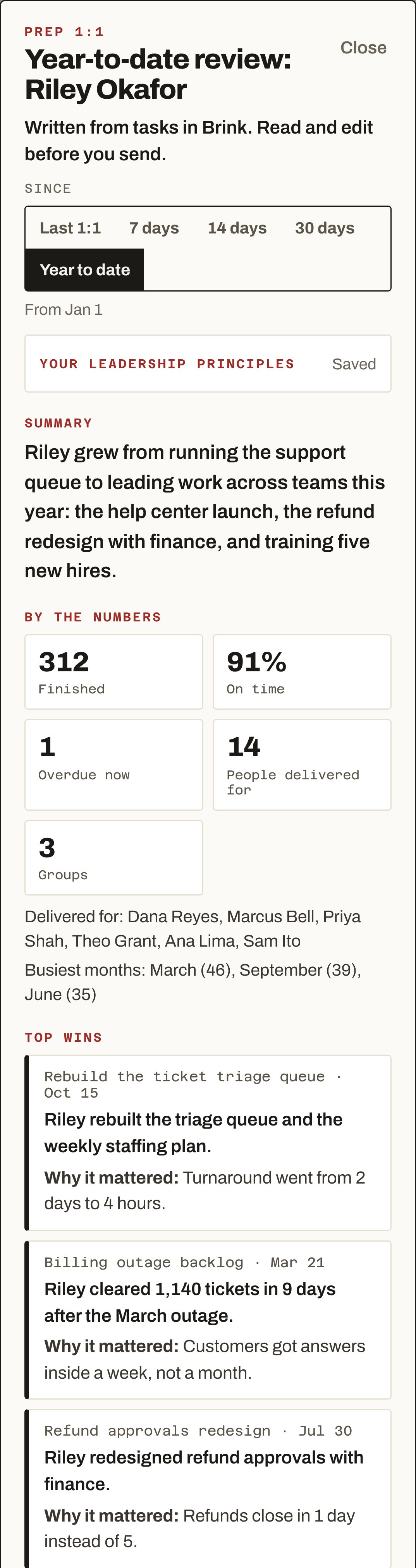
Same Prep 1:1, set to Year to date. Brink counts the year from the tasks and drafts a review Dana can edit, copy or email. Useful at review time, or when someone moves to a new manager.

  • SummaryRiley grew from running the support queue to leading work across teams this year: the help center launch, the refund redesign with finance, and training five new hires.
  • By the numbers312 finished · 91% on time · 1 overdue now · 14 people delivered for · 3 groups.
  • Top winsThe triage queue (turnaround from 2 days to 4 hours). The March outage backlog (1,140 tickets in 9 days). The refund redesign (1 day instead of 5).
  • StrengthsTurns a messy process into a simple one people keep using. Calm and fast in an incident.
  • Development areasRaise a slipping date early, before there is a fix. Bring finance and legal in at the start of cross-team work.
  • Looking aheadReady to own new-hire training for the whole support team.
Year-to-date review: Riley Okafor. Summary. By the numbers: 312 finished, 91% on time, 1 overdue now, 14 people delivered for, 3 groups. Top wins.
Fair to both sides

Same tasks. Two honest views.

Track one real task today. Let review time take care of itself.

Start free

Free to start. No card. Write my review and Prep 1:1 are in Brink Pro.